Get Certified for Financial Modeling (FMVA)®
Gain in-demand industry knowledge and hands-on practice that will help you stand out from the competition and become a world-class financial analyst.
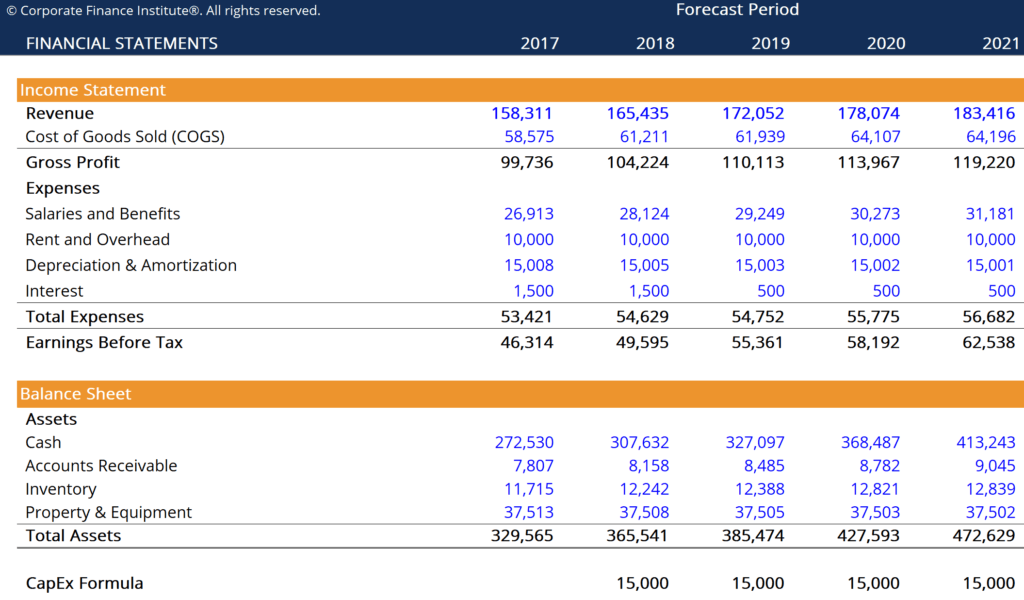
This CapEx Formula template helps you calculate the amount of capital expenditures using numbers in the income statement and balance sheet.
Below is a screenshot of the CapEx Formula template:
Click the button below to download our free CapEx Formula template!
CapEx (short for Capital Expenditures) is the money invested by a company in acquiring, maintaining, or improving fixed assets such as property, buildings, factories, equipment, and technology.
If you have access to a company’s cash flow statement, then no calculation is necessary and you can simply see the capital expenditures that were made in the Investing Cash Flow section.
If you don’t have access to the cash flow statement, it’s possible to calculate the net capital expenditure if depreciation is broken out on the income statement (which most, but not all, companies do).
To calculate capital expenditures, follow these steps:
The CapEx formula is: CapEx = PP&E (current) – PP&E (prior) + Depreciation
Connect what you just learned to a clear career path with CFI’s role‑based courses and certification programs.
For more resources, check out our business templates library to download numerous free Excel modeling, PowerPoint presentation, and Word document templates.







